 For years, one of the simplest rules in IT security has been to keep systems patched.
Install the updates. Reboot when required. Make sure Windows Update is current. Move on.
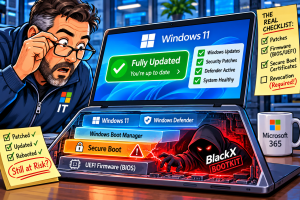
That advice still holds true, but a new Windows bootkit called BlackX is a reminder that “fully patched” doesn’t always mean fully protected.
Security researchers recently found BlackX on Windows systems that had installed the available Microsoft updates. The machines weren’t missing patches. They were still vulnerable because one important part of Microsoft’s Secure Boot mitigation required an extra step that wasn’t automatically enforced.
That’s a problem because most administrators don’t expect a security update to work that way.
BlackX targets UEFI, the firmware that starts running before Windows loads. UEFI handles the early stages of the boot process, including hardware initialization and the handoff to the operating system.
One of its security features is Secure Boot.
Secure Boot is designed to stop unauthorized code from loading during startup. It checks digital signatures on boot components and allows only trusted software to run. In theory, that gives Windows a clean and trusted starting point before the operating system and its security tools come online.
Bootkits go after that trust chain.
If malware can run before Windows fully starts, it gets a major advantage. It can load malicious code before many antivirus, endpoint protection and operating system defenses are active. It can also become extremely difficult to detect and remove.
BlackX isn’t the first malware to do this.
In 2023, researchers documented BlackLotus, the first known UEFI bootkit seen in real attacks that could bypass Secure Boot on fully updated Windows 11 systems.
Both BlackLotus and BlackX abuse a Windows boot manager flaw known as Baton Drop, tracked as CVE-2022-21894.
Microsoft fixed the underlying vulnerability in 2022. The problem was what happened next.
Older Windows boot managers had already been digitally signed using Microsoft’s Windows Production PCA 2011 certificate. Even after Microsoft fixed the flaw, systems could still trust older vulnerable boot components because that certificate remained valid.
Microsoft later introduced new Secure Boot certificates and provided a way to revoke trust in the older ones.
But installing the Windows updates alone didn’t necessarily complete that process.
That’s the part that matters.
For many systems, an administrator still needed to manually trigger the revocation process so Windows would stop trusting vulnerable older boot components.
If that didn’t happen, the system could be fully updated and still accept code that attackers could use to bypass Secure Boot.
That’s exactly what researchers found with BlackX.
From an administrator’s point of view, this is pretty unusual.
Normally, when Microsoft releases a security update, you install it and the fix is active. There may be a reboot. There may be compatibility issues. But there usually isn’t a hidden second phase where the most important part of the protection still needs to be manually enabled.
There was a reason Microsoft handled it cautiously.
Revoking old Secure Boot certificates too aggressively could leave some systems unable to boot, particularly systems with older firmware, unusual boot configurations or dependencies on components signed with those older certificates.
Microsoft had to balance security against the risk of breaking machines.
That’s understandable.
The communication around it is harder to defend.
If an update doesn’t fully protect a system until an administrator performs another action, that should be extremely obvious.
It shouldn’t require digging through Knowledge Base articles, Secure Boot documentation and registry instructions to figure out that a supposedly patched system is still exposed.
That’s especially important because the threat isn’t theoretical anymore.
BlackLotus already proved attackers could bypass Secure Boot in the real world. BlackX shows that the same basic weakness can still be useful years later when the required revocation hasn’t been completed.
There’s another wrinkle.
Microsoft’s original 2011 Secure Boot certificates have now reached expiration, and Windows is moving to newer 2023 certificates. That transition has been underway for years because Microsoft knew replacing certificates used across an enormous number of PCs, servers and virtual machines couldn’t happen overnight.
Systems that don’t receive the newer certificates may continue to boot normally, but they can eventually lose access to future boot-level security protections.
So this isn’t just about one piece of malware.
It’s also about whether Windows systems are actually ready for the next generation of Secure Boot protections.
For businesses, the lesson is simple.
Patch management can’t be treated as nothing more than checking whether Windows Update says everything is current.
Firmware matters. Secure Boot configuration matters. Certificate state matters. BIOS updates matter. So do the security changes that Microsoft sometimes ships in stages because enabling them automatically could break older systems.
Most small businesses aren’t going to review Secure Boot certificate databases or Windows boot manager revocation settings themselves.
They shouldn’t have to.
But whoever manages their IT should know when an update requires more than simply clicking Install.
BlackX also highlights a bigger issue with modern security.
Attackers increasingly look for ways to get underneath the operating system instead of fighting security software after Windows is already running.
That makes firmware, boot security and hardware trust much more important than they used to be.
A compromised boot process can give malware a foothold before Windows Defender, endpoint protection or other security tools have much of a chance to respond.
That doesn’t mean businesses should panic over BlackX.
These bootkits still require attackers to compromise a system first and obtain significant privileges before they can install themselves.
But once they get that far, persistence at the boot level can make the cleanup considerably more difficult.
It also means reinstalling Windows may not always be enough.
For administrators, the bigger concern is the assumption that “fully patched” equals “fully protected.”
Most of the time, that assumption is reasonable.
This time, it wasn’t.
And when a security fix requires another step before the protection actually takes effect, Microsoft needs to make that much clearer.
