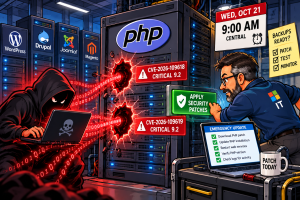
 THIS IS NOT A DRILL! – If you manage a website running PHP, today would be a very good day to pay attention.
The PHP development team has taken the unusual step of announcing 2 emergency security patches before they’re even available. Both vulnerabilities carry a severity rating of 9.2 out of 10. Security researchers warn that attackers may begin exploiting them almost immediately after the fixes arrive.
The patches are scheduled for Wednesday, October 21, at 9:00 AM Central. However, PHP maintainers could release them earlier if additional technical details leak or they detect active exploitation.
And this isn’t just another WordPress plugin vulnerability. We’re talking about PHP itself, the programming language behind an enormous portion of the internet. WordPress, Drupal, Joomla, Magento, MediaWiki, and countless business applications depend on it.
A plugin vulnerability might affect a few thousand websites. A serious PHP vulnerability could potentially affect millions, regardless of which content management system they’re running.
That’s what makes this particularly concerning.
What We Know About PHP2Shell
The 2 vulnerabilities, identified as CVE-2026-109618 and CVE-2026-109619, are associated with an exploit called PHP2Shell. Leaked material reportedly shows attackers executing commands remotely against servers running several popular PHP applications.
Remote code execution is about as bad as it sounds. Under the right circumstances, an attacker could run commands on a vulnerable web server without legitimate access.
That could mean stealing databases, modifying files, installing malware, creating backdoors, or using the compromised server to attack other systems.
The PHP development team has confirmed the existence and severity of both vulnerabilities. However, it hasn’t published the full technical details or affected version numbers.
Reports suggesting that virtually every PHP release dating back to PHP 5 is vulnerable remain unconfirmed by the maintainers.
Still, security researchers aren’t treating this as a routine update.
Security firm watchTowr has independently confirmed the vulnerabilities are real. Huntress has issued an advisory, while Sansec warns that automated attacks could begin within minutes of public disclosure.
That’s not much of a window for administrators who haven’t prepared.
Why Updating WordPress Won’t Fix This
A lot of website owners don’t know which PHP version their sites run. Some don’t even know who’s responsible for updating it.
With managed hosting, that responsibility usually falls on the hosting provider. But if you’re running a dedicated server, VPS, or your own hosting environment, the responsibility may fall entirely on you.
Updating WordPress won’t fix this. Neither will updating themes or plugins.
The reported vulnerabilities affect PHP itself, so administrators need to patch the actual PHP runtime.
That distinction matters. I’ve seen plenty of websites where WordPress and its plugins are completely current, but the underlying server runs an outdated PHP version.
And if you’re still running an unsupported PHP release, the situation could be considerably worse. Older versions may never receive patches. That could leave administrators with little choice but to upgrade PHP or take affected systems offline.
Cloudflare has also reported early attacks against PHP websites and deployed emergency firewall rules for its customers, including those on its free service.
Those rules may help block known attack methods. But they’re temporary protection, not a substitute for patching PHP.
Some researchers also recommend temporarily blocking certain file-upload requests. That might reduce exposure, but it can also break WordPress media uploads, contact forms, shopping carts, and other website functions.
I wouldn’t blindly apply those restrictions to a production server.
For websites that can’t receive patches immediately, temporarily taking the PHP application offline may be the safer option.
And putting WordPress into maintenance mode isn’t necessarily enough. PHP can still process incoming requests before WordPress displays its maintenance page.
Personally, I’d rather deal with a brief maintenance window than spend several days investigating a compromised server.
What Website Administrators Should Do Now
There’s also a lesson here about website security that I’ve been emphasizing for years.
Keeping WordPress updated is important. So is maintaining plugins, themes, and security tools like Wordfence. But none of those things replaces maintaining the operating system, web server, and PHP installation underneath them.
A website can look perfectly healthy from the WordPress dashboard while the server itself remains exposed.
For anyone responsible for PHP hosting, the immediate priority is to identify every PHP installation and confirm that backups are current.
Once the patches arrive, install the corrected PHP releases. Then verify the running versions, restart the necessary services, and test the websites.
I’d also review server logs for suspicious activity that may have occurred before patching.
And don’t forget about development sites, abandoned applications, or older websites that remain publicly accessible.
Attackers don’t care whether you actively maintain a website. If it’s reachable and vulnerable, it’s a potential target.
The PHP maintainers haven’t published enough technical information to establish exactly how widespread the exposure is. But 2 critical vulnerabilities, leaked exploit information, and warnings from multiple security firms are enough reason to take this seriously.
This isn’t one I’d put off until the weekend.
Update: October 21, 2026
The PHP development team has released emergency security updates addressing both PHP2Shell vulnerabilities, CVE-2026-109618 and CVE-2026-109619.
The corrected releases are PHP 8.5.12, 8.4.27, 8.3.36, and 8.2.35. Both vulnerabilities can allow unauthenticated remote code execution, and the PHP development team is urging administrators to update immediately.
PHP 8.1 and earlier are no longer officially supported. Administrators running older versions should investigate supported upgrades or security fixes provided by their operating system or PHP vendor.
The bottom line hasn’t changed: Updating WordPress, its themes, or plugins won’t resolve these vulnerabilities. PHP itself must be patched.
For downloads, technical details, and official guidance, visit PHP.net.
