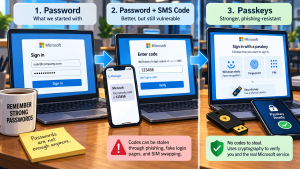
 For years, the security advice was simple: turn on multifactor authentication.
IT people repeated it endlessly. Microsoft pushed it. Insurance companies started requiring it. Cybersecurity audits looked for it. Eventually, most businesses got the message.
Users learned the routine. Enter the password. Wait for the text message. Type in the 6-digit code. Get back to work.
Now Microsoft is changing all of that.
Microsoft Is Moving Away From SMS MFA
Beginning September 1, 2026, Microsoft started automatically steering users who rely on SMS or voice authentication toward passkeys. The bigger change arrives February 1, 2027, when Microsoft plans to stop providing SMS and voice authentication for most Microsoft Entra users.
That doesn’t mean MFA is going away, it’s the opposite. Microsoft is moving toward authentication methods that are much harder to steal.
The problem with SMS-based MFA is that the code itself is still a secret.
If somebody can trick you into giving them that code, they can use it.
Modern phishing attacks have gotten very good at doing exactly that. A fake Microsoft 365 login page can look nearly identical to the real thing. The victim enters a username and password, receives an MFA code and dutifully types that in too.
At that point, the attacker may have everything they need to complete the login.
Some attacks go further and capture an authenticated browser session, allowing the attacker to bypass the need to keep entering credentials. That’s one reason simply adding another code to a password doesn’t provide the level of protection it once did.
The numbers help explain why Microsoft is moving faster on this.
Microsoft’s 2026 Digital Defense Report says more than half of the intrusions it observed involving valid accounts led to additional credential theft. Microsoft also detected more than 145 million QR-code phishing attacks between July 2025 and June 2026.
Attackers have figured out that stealing an identity is often easier than breaking into a computer.
Why Passkeys Are Harder to Steal
Passkeys tackle that problem differently.
Instead of sending you a code that can be copied, forwarded or entered into the wrong website, a passkey uses cryptography to verify both the user and the service being accessed.
There’s no 6-digit number sitting on the screen waiting to be stolen.
On a Windows PC, that authentication may happen through Windows Hello using a PIN, fingerprint or facial recognition. Other devices can store passkeys too. Physical FIDO2 security keys are another option.
The important difference is that the authentication process stays tied to the legitimate service. A fake Microsoft login page can’t simply ask for your passkey and reuse it somewhere else.
That’s what makes passkeys resistant to one of the biggest problems with traditional MFA: phishing.
The February 2027 Deadline
Microsoft has already started enabling passkeys for users who currently use SMS or voice authentication. Those users may begin seeing prompts encouraging them to register a passkey when they sign in.
For now, those prompts can generally be postponed.
That changes next year.
On February 1, 2027, Microsoft plans to end its own SMS and voice authentication service for most users. Anyone still relying exclusively on those methods may need to register a passkey before they can continue signing in.
There are some exceptions. Global Administrators and certain external users have a later deadline of July 1, 2027.
Organizations that have a legitimate reason to keep SMS or voice authentication will still have options, but Microsoft won’t provide the telecom service directly anymore. Businesses that need those methods will have to use a supported outside telephony provider.
For most small and mid-sized businesses, that’s probably not the direction I’d take.
The better approach is to start figuring out who’s still using SMS or voice authentication and move those users to phishing-resistant methods before Microsoft forces the issue.
The Real Work Is Account Recovery
That also gives IT departments time to answer the questions that always come with authentication changes.
- What happens when somebody replaces a phone?
- How does a new employee register their first passkey?
- What happens when a laptop dies?
- What authentication method should be available as a backup?
- How do you recover an account without creating an easy path for an attacker to do the same thing?
Those questions matter just as much as the technology itself.
I’ve watched plenty of security products create problems because somebody focused entirely on stopping attackers and forgot that legitimate users eventually lose phones, replace computers and forget things.
Authentication has to be secure, but it also has to be recoverable.
Don’t Wait Until January
There’s another reason businesses should deal with this now instead of waiting until January.
Authentication methods tend to become invisible once they work.
A company may have configured MFA years ago and never looked at it again. Different employees may be using different methods. Some may use Microsoft Authenticator. Others may receive text messages. A few may still receive phone calls.
Newer employees may already be using Windows Hello or passkeys without realizing there’s anything unusual about it.
That’s common.
It also means a surprising number of organizations probably don’t know exactly how their users are authenticating today.
February 2027 sounds far enough away to ignore.
It isn’t.
The best time to find out that 14 employees still depend on text-message authentication is during a planned review, not Monday morning after Microsoft changes the sign-in process.
MFA was an important step forward, and it still is.
But security doesn’t stop moving just because users finally got comfortable with the last change.
We spent years convincing people that a password alone wasn’t enough.
Now we have to explain that a password plus a text message isn’t where authentication ends either.
